ALX Webstack Portfolio Project
Afrikai Microservices System
📖 Project Overview
The Afrikai Microservices System is a modular, scalable, and secure task management platform designed with a microservices architecture. It empowers users to manage tasks with labeling features while ensuring secure authentication and seamless inter-service communication. This system is built with Spring Boot, Spring Cloud, and Netflix Eureka, following industry best practices for distributed systems.
🎯 Core Objectives
- Scalability: Designed for horizontal scaling to handle increasing workloads.
- Modularity: Decoupled services for maintainability and independent deployment.
- Security: Role-Based Access Control (RBAC) with JWT Authentication.
- Resilience: Fault-tolerant communication through service discovery and gateway routing.
🏗️ Project Structure
afrikai_apis/
├── api-gateway/           # Centralized API Gateway for routing and security
├── docs/                  # Documentation for all microservices
├── label-service/         # Microservice for managing labels
├── service-registry/      # Eureka-based service discovery
├── task-service/          # Microservice for managing tasks
├── user-service/          # Handles user management and authentication
├── pom.xml                # Parent Maven configuration
└── README.md              # Project documentation
⚙️ Technology Stack
-
Java 17
-
Spring Boot 3.x
-
Spring Cloud (Eureka, Gateway)
-
Spring Security (JWT Authentication)
-
MySQL (Database for services)
-
Feign Clients for inter-service communication
-
Maven (Build tool)
🔥 Core Features
🏷️ Label Management
Users can create, update, and delete labels to organize tasks.
✅ Task Management
Users can create tasks, assign labels, and manage task workflows.
🔐 User Authentication & Authorization
JWT-based authentication
Role-based access control (Client, Admin, Manager)
🔄 Service Discovery
Dynamic service registration and discovery using Netflix Eureka.
🚪 API Gateway
Central entry point for all services with routing and security handled by the Gateway.
🚀 Getting Started
📦 Prerequisites
Java 17
Maven 3.8+
MySQL running locally or in Docker (if you choose to run Docker for MySQL)
Docker (optional for deployment)
🔧 Setup Instructions
Clone the Repository
git clone https://github.com/Nadira3/afrikai_apis.git
cd afrikai_apis
Configure Databases
Ensure MySQL databases are created for each service:
user_service_db

task_service_db

label_service_db
Create these databases and update the connection configurations in application.yml files for each service with the correct username and password.
Update Environment Variables
Each service has its own application.yml or .env file. Configure database credentials and JWT secrets accordingly.
Build the Project
mvn clean install
Run Services Individually
Service Registry
cd service-registry
mvn spring-boot:run
API Gateway
cd api-gateway
mvn spring-boot:run
User Service
cd user-service
mvn spring-boot:run
Task Service
cd task-service
mvn spring-boot:run
Label Service
cd label-service
mvn spring-boot:run
Verify Eureka Dashboard Visit http://localhost:8761 to confirm that all services are registered.
📡 API Overview
🔐 Authentication Endpoints (User Service)
✅ Task Management (Task Service)
🏷️ Label Management (Label Service)
🧪 Testing
✅ Running Tests
Execute unit and integration tests across all services:
mvn test
📝 Sample Test Case (User Authentication)
@Test
void whenValidUser_thenReturnsJwtToken() throws Exception {
    AuthRequest authRequest = new AuthRequest("user@example.com", "password123");

    mockMvc.perform(post("/api/auth/login")
            .contentType(MediaType.APPLICATION_JSON)
            .content(objectMapper.writeValueAsString(authRequest)))
        .andExpect(status().isOk())
        .andExpect(jsonPath("$.token").exists());
}
🌐 Architecture Diagram
proposed design
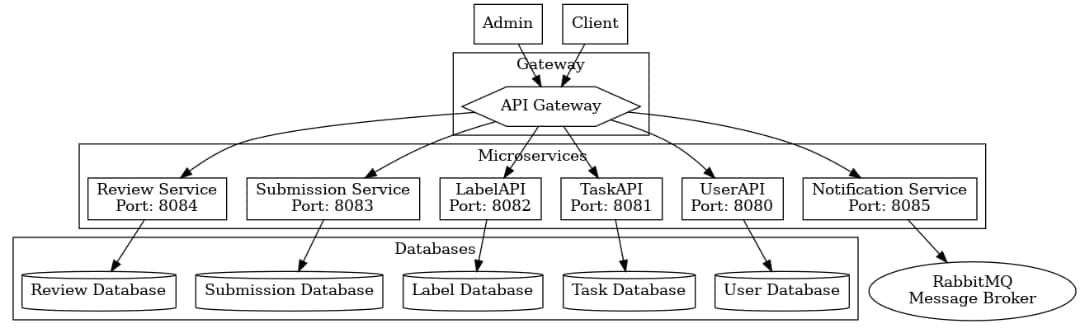
exexcution flow
graph LR
    A[Service Registry - Eureka] --> B[API Gateway]

    %% Microservices
    B --> C[Task Service]
    B --> D[Label Service]
    B --> E[User Service]
    B --> F[Payment Service]

    %% Databases
    C --> G[Task Database]
    D --> H[Label Database]
    E --> I[User Database]
    F --> J[Payment Database]

    %% Authentication
    B --> K[Authentication and Authorization Service]
    K --> L[JWT Authentication]

    %% Wallet System
    E --> M[User Wallet]
    F --> M

    %% Monitoring and Health Checks
    B --> N[Monitoring Service]
    N --> O[Health Check]
    N --> P[Metrics]

    %% Subgraph Representation
    subgraph Eureka [Service Registry - Eureka]
        A
    end

    subgraph Gateway [API Gateway]
        B
    end

    subgraph Services [Microservices]
        C[Task Service]
        D[Label Service]
        E[User Service]
        F[Payment Service]
    end

    subgraph Databases [Databases]
        G[Task Database]
        H[Label Database]
        I[User Database]
        J[Payment Database]
    end

    subgraph Security [Security]
        K[Authentication Service]
        L[JWT Authentication]
    end

    subgraph Monitoring [Monitoring]
        N[Monitoring Service]
        O[Health Check]
        P[Metrics]
    end
Key Workflow:
-
Service Discovery All microservices register with Eureka Service Registry upon startup.
-
API Gateway The API Gateway acts as the entry point for all incoming requests, routing them to the appropriate service based on the endpoint. It also handles authentication and authorization.
-
Communication between Services
Task Service communicates with Label Service and queries the MySQL database for task and label management.
User Service manages authentication, user details, and JWT generation.
🤝 Contribution Guidelines
-
Fork the repository.
-
Clone the forked repo.
-
Create a feature branch (git checkout -b feature/your-feature).
-
Commit changes (git commit -m "feat: add new feature").
-
Push to the branch (git push origin feature/your-feature).
-
Submit a Pull Request.
📄 License
Distributed under the ALX Backend Curriculum License.